FAQ
Search
-
What are these sections and articles doing here?
This FAQ is a section in the General category of your help centre knowledge base. We created this category and a few common sections to help you get started with your Help Centre.
The knowledge base in the Help Centre consists of three main page types: category pages, section pages, and articles. Here's the structure:
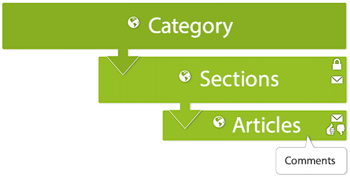
You can create your own categories, sections, and articles and modify or completely delete ours. See the Organising knowledge base content and Creating articles in the Help Centre to learn how.
-
How do I customise my Help Centre?
You can modify the look and feel of your Help Centre by changing colours and fonts. See Branding your Help Centre to learn how.
You can also change the design of your Help Centre. If you're comfortable working with page code, you can dig in to the site's HTML, CSS, and JavaScript to customise your theme. To get started, see Customising the Help Centre.
-
How do I publish my content in other languages?
If you have configured your Help Centre to support multiple languages, you can publish content in your supported languages.
Here's the workflow for localising your Help Centre content into other languages:
- Get your content translated in the other languages.
- Configure the Help Centre to support all your languages.
- Add the translated content to the Help Centre.
For complete instructions, see Localising the Help Centre.
-
How can agents leverage knowledge to help customers?
You can use our Knowledge Capture app to leverage your team’s collective knowledge.
Using the app, agents can:
- Search the Help Centre without leaving the ticket
- Insert links to relevant Help Centre articles in ticket comments
- Add inline feedback to existing articles that need updates
- Create new articles while answering tickets using a pre-defined template
Agents never have to leave the ticket interface to share, flag, or create knowledge, so they can help the customer, while also improving your self-service offerings for other customers.
To get started, see our Knowledge Capture documentation.
And before your agents can start creating new knowledge directly from tickets, you’ll need to create a template for them to use. To help you along, we’ve provided some template ideas below. You can copy and paste any sample template below into a new article, add the KCTemplate label to the article, and you’ll be all set.
Q&A template:
[Title]
Question
write the question here.Answer
write the answer here.Solution template:
[Title]
Symptoms
write the symptoms here.Resolution
write the resolution here.Cause
write the cause here.How-to template:
[Title]
Objective
write the purpose or task here.Procedure
write the steps here.
